

 English


PROFESSIONAL USB-C STORAGE
SR4-B32+4-Bay USB-C Storage with LCM Display and On-Device Management
Hardware RAID. Direct Control.

USB-C
20 Gbps

Hardware
RAID

4 Hot-Swap Drive Bays
ARCHITECTURE
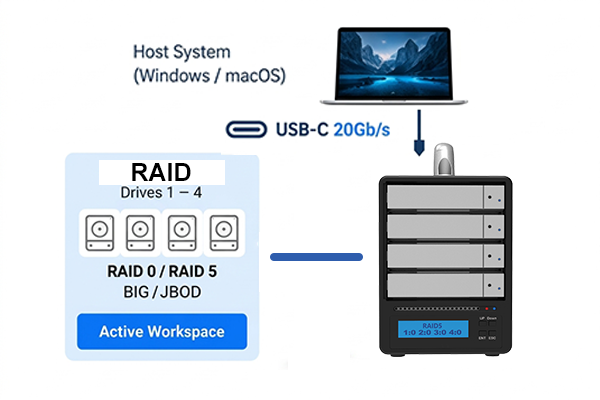
Direct RAID Control with LCM
The SR4-B32+ adds a built-in LCM display and setup controls, allowing users to view RAID status, drive information,temperature, fan speed, and rebuild status directly on the enclosure. RAID configurations can also be created or deleted without relying on host management software.
KEY FEATURES
Built for Professional Environments

Flexible Hardware RAID
Drive Information & System Monitoring
LCM Firmware Update Support

Reliable Operation

Easy Drive Maintenance
DEPLOYMENT & INTEGRATION
Designed for Professional Integration
The SR4-B32+ combines hardware RAID protection with direct enclosure-based monitoring, allowing users to check storage status without first opening a software utility. Whether used in a studio, workstation environment, laboratory, or mobile production workflow, essential RAID information remains visible directly on the storage system.

One Enclosure

Four Drives
Hardware RAID

Direct Control
PROFESSIONAL WORKFLOWS
Flexible Workflows for Real-World Applications
Designed for Professional Workflows
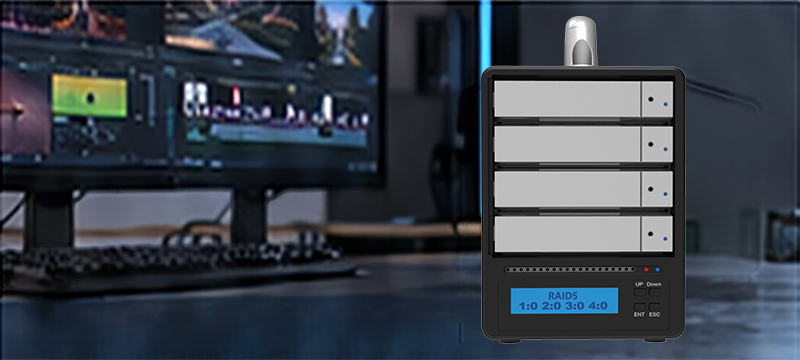
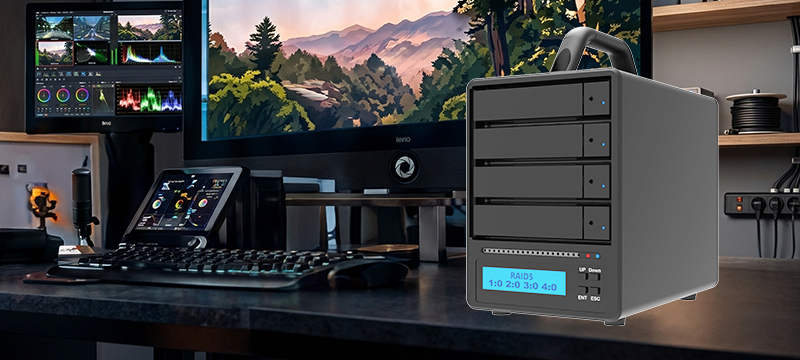
Creative Production
– DIT Ingest & Studio Handoff
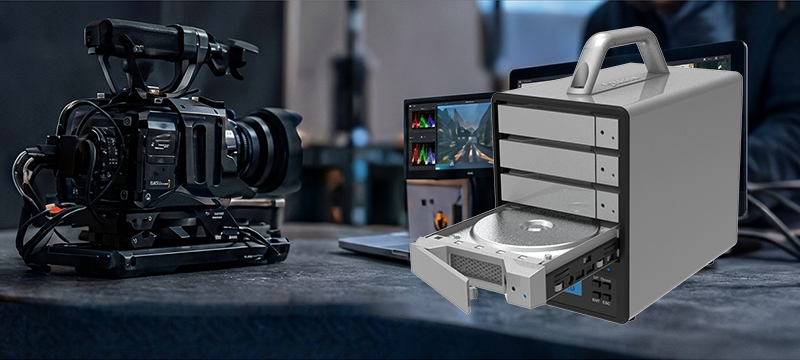
Backup & Archiving
– Long-Term Storage
Wide Compatibility
– Works across major platforms and supports mobile backup via Easy Data Vault
RAID MODE GUIDE
Choose the Right RAID Mode for Your Workflow

RAID 0
Maximum Performance
Combines drive performance for higher speed. Ideal for high-bandwidth workflows.

RAID 5
Performance + Protection
Balances performance and data protection. Ideal for production environments.

BIG
Maximum Capacity
Spans multiple drives into one large volume. Maximizes total storage capacity.
JBOD
Flexibility
Each drive is recognized individually. Ideal for flexible management.

RAID is not a substitute for backup.
RAID helps prevent data loss from drive failure but does not protect against accidental deletion, malware or other risks.
Choose Your Workflow DAS
Designed for Professional Workflows
Compare SR4-B32+ and ST4-B32 to find the right solution for your workflow.
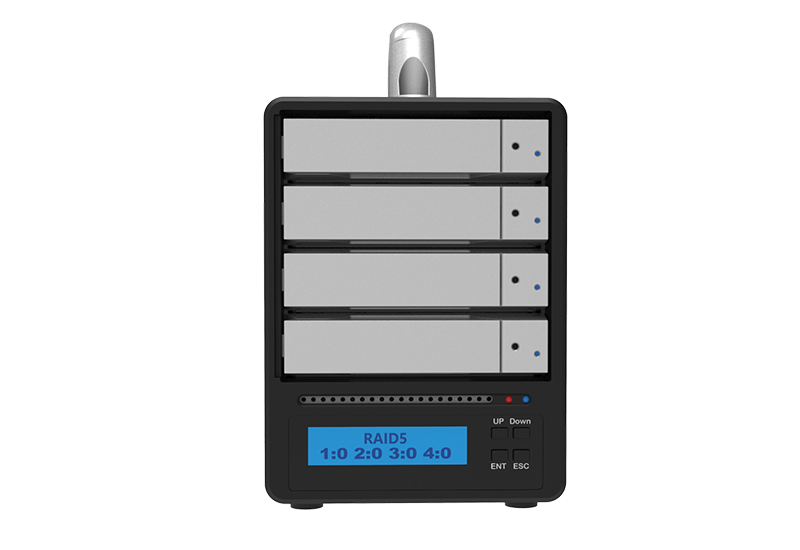
SR4-B32+
4 Bays (3.5” / 2.5” SATA)
RAID 0 / 5 / BIG / JBOD
Up to 120TB
Ideal for smaller teams
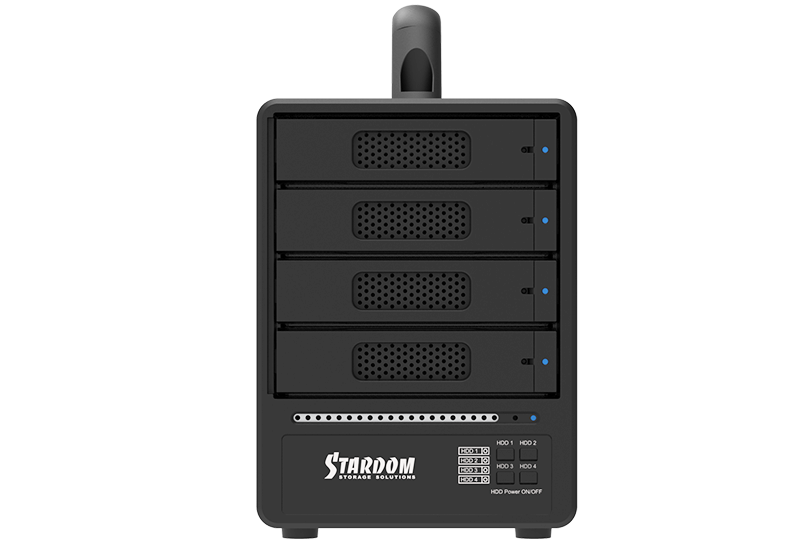
Product Views
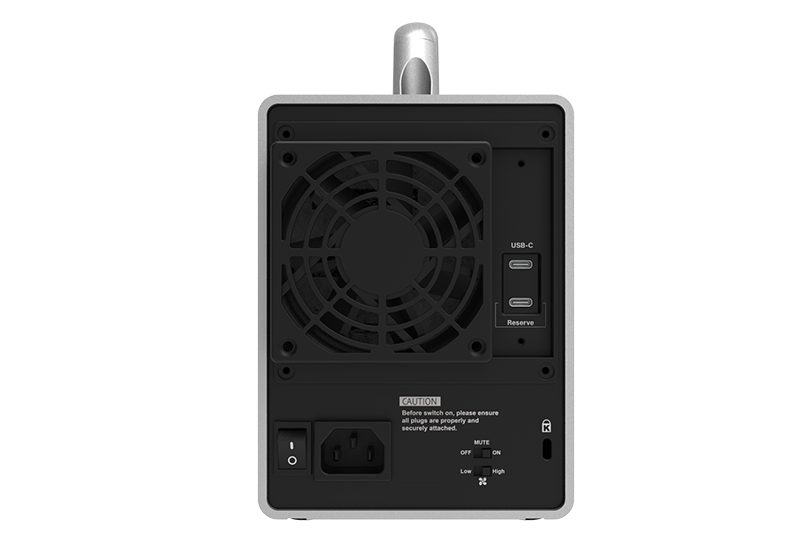
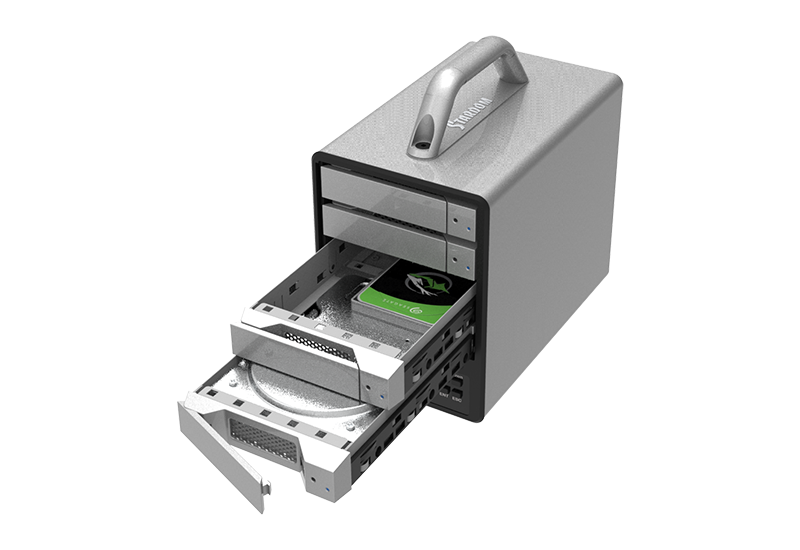
Technical Resources
| Model No | SR4-B32+ |
|---|---|
| Product Type | 4-Bay USB-C Hardware RAID Storage with Direct RAID Control |
| Interfaces | USB 3.2 Gen 2x2 Type-C, up to 20Gbps |
| Supported Drives | 4 × 3.5-inch / 2.5-inch SATA III HDD/SSD |
| RAID Modes | RAID 0 / RAID 5 / BIG / JBOD |
| RAID Controller | Hardware RAID |
| LCM | RAID configuration, system status, drive information, temperature, fan speed, and rebuild monitoring |
| LCM Firmware Update | Supported via dedicated USB-C service port |
| Drive Trays | Lockable hot-swappable trays |
| Connectivity | USB-C PC and Mac; compatible Thunderbolt™ 3/4/5 USB-C ports as a USB storage device |
| Operating Systems | Windows 7 or later / macOS 10.10 or later / Linux |
| Windows Management | RAID status, alerts, and rebuild monitoring |
| Cooling | 80mm fan with High/Low speed switch |
| System Alerts | Warning LED and buzzer for overheating and fan failure |
| Power Supply | Internal 150W, AC 100–240V, 50–60Hz |
| Certifications | CE / FCC / RoHS |
| Dimensions | 210 × 124 × 166 mm (L × W × H) |
| Weight | 3.4 kg per unit with packaging, excluding drives |
| Mobile Support | Easy Data Vault for compatible USB-C iPhone and iPad devices |
| Included Accessories | • 1x USB 3.2 Gen 2x2 Type-C to Type-C Cable • 1x Power Cord • 1x Accessory Kit (Drive Screws, Keys) • 1x Quick Installation Guide |
What is the main difference between the SR4-B32 and SR4-B32+?
Both models use the same core 4-bay hardware RAID platform and support USB 3.2 Gen 2x2, RAID 0/5/BIG/JBOD, lockable hot-swappable trays, Windows monitoring, and a 150W internal power supply.
The SR4-B32+ adds a built-in LCM display and setup controls, providing more detailed system information and direct RAID management from the enclosure.
The SR4-B32+ adds a built-in LCM display and setup controls, providing more detailed system information and direct RAID management from the enclosure.
Which RAID modes does the SR4-B32+ support?
The SR4-B32+ supports RAID 0, RAID 5, BIG, and JBOD.
Can RAID be configured without installing software?
Yes. Users can create or delete RAID configurations directly through the built-in LCM display and setup controls.
What information can the LCM display?
The LCM can display:
• RAID status
• Drive capacity
• Drive temperature
• System temperature
• Fan speed
• RAID rebuild status
Compatible SSDs may also provide power-on count and power-on hours.
• RAID status
• Drive capacity
• Drive temperature
• System temperature
• Fan speed
• RAID rebuild status
Compatible SSDs may also provide power-on count and power-on hours.
What does “XXX” mean on the LCM?
“XXX” indicates that the installed HDD or SSD does not provide the corresponding information.
What happens if a drive fails in RAID 5?
The RAID 5 array can remain accessible in degraded mode after a single drive failure.
Replace the failed drive with a compatible drive to rebuild the array.
A separate backup should still be maintained.
Replace the failed drive with a compatible drive to rebuild the array.
A separate backup should still be maintained.
Does the SR4-B32+ support hot-swapping?
Yes. The four lockable front-access drive trays support hot-swapping for drive replacement and maintenance.
What happens when the USB cable is disconnected?
The LCM displays “USB Disconnected” and the setup buttons remain locked.
Normal LCM operation resumes after the USB connection is restored.
Normal LCM operation resumes after the USB connection is restored.
Can the SR4-B32+ connect to Thunderbolt™ 3/4/5 computers?
Yes. It can connect through compatible Thunderbolt™ USB-C ports as a USB storage device.
The SR4-B32+ is not a native Thunderbolt device, and actual connection speed depends on the USB capability of the host.
The SR4-B32+ is not a native Thunderbolt device, and actual connection speed depends on the USB capability of the host.
Can SATA SSDs be used in all four bays?
Yes. All four bays support compatible 2.5-inch SATA SSDs.
For RAID operation, drives of the same model and capacity are recommended.
For RAID operation, drives of the same model and capacity are recommended.
Does RAID 5 replace a backup?
No. RAID 5 protects against a single drive failure but does not protect against accidental deletion, malware, enclosure damage, theft, loss, or multiple drive failures.
Important data should also be stored in a separate backup.
Important data should also be stored in a separate backup.
Can the LCM firmware be updated?
Yes. The SR4-B32+ includes a dedicated USB-C service port for LCM control firmware updates.
| Product Name | Brand | Drive Type | Series | Model Number | Capacity |
|---|---|---|---|---|---|
| SR4-B32+ | Seagate | 3.5" HDD | Ironwolf Pro | ST16000NE000 | 16TB |
| SR4-B32+ | Seagate | 3.5" HDD | EXOS X22 | ST22000NM001E | 22TB |
| SR4-B32+ | WD | 3.5" HDD | DC HC590 | WUH722626ALE6L4 | 26TB |
| SR4-B32+ | Kingston | 2.5" SSD | SA400S72 | 240GB | |
| SR4-B32+ | Kingston | 2.5" SSD | SKC400 | 512GB | |
| SR4-B32+ | Kingston | 2.5" SSD | Hyper X | 480GB | |
| SR4-B32+ | KIOXIA | 2.5" SSD | EXCERIA | 960GB | |
| SR4-B32+ | Synology | 2.5" SSD | SAT5200 | 480GB | |
| SR4-B32+ | TOOMORE | 2.5" SSD | TP100 | 480GB | |
| SR4-B32+ | Crucial | 2.5" SSD | BX500 | 240GB | |
| SR4-B32+ | TCELL | 2.5" SSD | TT550 | 480GB | |
| SR4-B32+ | KLEVV | 2.5" SSD | N610 | 512GB | |
| SR4-B32+ | OWC | 2.5" SSD | Mercury Extreme Pro 6G | 240GB | |
| SR4-B32+ | TIGO | 2.5" SSD | S300 | 120GB | |
| SR4-B32+ | Samsung | 2.5" SSD | 860 QVD | 4TB | |
| SR4-B32+ | Samsung | 2.5" SSD | 860 PRO | 1TB | |
| SR4-B32+ | Samsung | 2.5" SSD | 870 EVO | 500GB | |
| SR4-B32+ | Intel SSD | 2.5" SSD | 730 Series | 480GB | |
| SR4-B32+ | Intel SSD | 2.5" SSD | 510 Series | 512GB | |
| SR4-B32+ | PQI | 2.5" SSD | S511 | 120GB | |
| SR4-B32+ | OCZ SOLID3 | 2.5" SSD | SOLID3 | 120GB | |
| SR4-B32+ | SKHYNIX | 2.5" SSD | S31 | 500GB | |
| SR4-B32+ | Fujitsu | 2.5" SSD | F500S | 480GB | |
| SR4-B32+ | ANACOMDA | 2.5" SSD | QS960 | 960GB | |
| SR4-B32+ | UMAX | 2.5" SSD | S330 | 480GB | |
| SR4-B32+ | Plextor | 2.5" SSD | PX-512S3C | 512GB | |
| SR4-B32+ | WD | 3.5" HDD | WUH722424ALE6L4 | 24TB | |
| SR4-B32+ | WD | 3.5" HDD | WD221KRYZ | 22TB | |
| SR4-B32+ | WD | 3.5" HDD | WUH722222ALE6L4 | 22TB | |
| SR4-B32+ | WD | 3.5" HDD | WD180PURZ | 18TB | |
| SR4-B32+ | WD | 3.5" HDD | WD161KRYZ | 16TB | |
| SR4-B32+ | WD | 3.5" HDD | WUH721414ALE64 | 14TB | |
| SR4-B32+ | WD | 3.5" HDD | WD120EFBX | 12TB | |
| SR4-B32+ | WD | 3.5" HDD | WD100PURZ-85W86Y0 | 10TB | |
| SR4-B32+ | WD | 3.5" HDD | WD8003FRYZ | 8TB | |
| SR4-B32+ | WD | 3.5" HDD | WD60PURX | 6TB | |
| SR4-B32+ | WD | 3.5" HDD | WD60EZAZ | 6TB | |
| SR4-B32+ | WD | 3.5" HDD | WD4000FYYZ-01UL1B0 | 4TB | |
| SR4-B32+ | WD | 3.5" HDD | WD30EZRX | 3TB | |
| SR4-B32+ | WD | 3.5" HDD | WD20EARS-00MVWB0 | 2TB | |
| SR4-B32+ | WD | 3.5" HDD | WD20EZAZ | 2TB | |
| SR4-B32+ | WD | 2.5" HDD | WD20SPZX | 2TB | |
| SR4-B32+ | WD | 3.5" HDD | WD10EZEX-00UD2A0 | 1TB | |
| SR4-B32+ | WD | 2.5" HDD | WD10SPZX | 1TB | |
| SR4-B32+ | Seagate | 3.5" HDD | ST32000NT000 | 32TB | |
| SR4-B32+ | Seagate | 3.5" HDD | ST30000NT011 | 30TB | |
| SR4-B32+ | Seagate | 3.5" HDD | ST28000NT000 | 28TB | |
| SR4-B32+ | Seagate | 3.5" HDD | ST22000NM001E | 22TB | |
| SR4-B32+ | Seagate | 3.5" HDD | ST22000NT001 | 22TB | |
| SR4-B32+ | Seagate | 3.5" HDD | ST20000NM007D | 20TB | |
| SR4-B32+ | Seagate | 3.5" HDD | ST12000DM0007 | 12TB | |
| SR4-B32+ | Seagate | 3.5" HDD | ST10000NE0004 | 10TB | |
| SR4-B32+ | Seagate | 3.5" HDD | ST8000AS0002 | 8TB | |
| SR4-B32+ | Seagate | 3.5" HDD | ST6000VX0001 | 6TB | |
| SR4-B32+ | Seagate | 3.5" HDD | ST5000AS0001 | 5TB | |
| SR4-B32+ | Seagate | 3.5" HDD | ST4000VM000 | 4TB | |
| SR4-B32+ | Seagate | 3.5" HDD | ST3000NM0005 | 3TB | |
| SR4-B32+ | Seagate | 3.5" HDD | ST32000641AS | 2TB | |
| SR4-B32+ | Seagate | 3.5" HDD | ST1000DM010 | 1TB | |
| SR4-B32+ | TOSHIBA | 3.5" HDD | MG09ACA18TE | 18TB | |
| SR4-B32+ | TOSHIBA | 3.5" HDD | HDWR21EUZSVA | 14TB | |
| SR4-B32+ | TOSHIBA | 3.5" HDD | MG07ACA12TE | 12TB | |
| SR4-B32+ | TOSHIBA | 3.5" HDD | MD06ACA10TV | 10TB | |
| SR4-B32+ | TOSHIBA | 3.5" HDD | MD04ACA600 | 6TB | |
| SR4-B32+ | TOSHIBA | 3.5" HDD | MD04ABA500V | 5TB | |
| SR4-B32+ | TOSHIBA | 3.5" HDD | MD04ABA400V | 4TB | |
| SR4-B32+ | TOSHIBA | 3.5" HDD | MG03ACA100 | 3TB | |
| SR4-B32+ | TOSHIBA | 3.5" HDD | DT01ACA200 | 2TB | |
| SR4-B32+ | TOSHIBA | 3.5" HDD | DT01ACA100 | 1TB | |
| SR4-B32+ | HGST | 3.5" HDD | HUH721212ALE600 | 12TB | |
| SR4-B32+ | HGST | 3.5" HDD | HUH721010ALN600 | 10TB | |
| SR4-B32+ | HGST | 3.5" HDD | HUH728080ALE600 | 8TB | |
| SR4-B32+ | HGST | 3.5" HDD | HUS726060ALE610 | 6TB | |
| SR4-B32+ | HGST | 3.5" HDD | HDN726040ALE614 | 4TB | |
| SR4-B32+ | HITACHI | 3.5" HDD | HDS723020BLA642 | 2TB | |
| SR4-B32+ | HITACHI | 3.5" HDD | HUA722010CLA330 | 1TB |
Need a Storage Solution for Your Project?
Contact our team for product selection, integration support or custom solutions.